September monthly product update
- New & Improved Guides and API Reference
- Direct Entry Support in Australia
- Sender Validation in Australia
- Maker Checker Support for Payouts via Dashboard and API
- Wallet Funds transfer between Customer GCA wallets
- Dynamic Sender Name for AUD NPP Payouts
- End of Day Balance report
- Memo Statement for Completed Payins and Payouts
- Transaction Disputes
- Account Confirmation Letter
- Enhanced 2FA via authenticator apps
- Link copied
Hello, we are committed to continuously improving our platform to tailor them to your business needs.We have been busy making the below enhancements over the last couple of months to serve you better.
New & Improved Guides and API Reference
We have vastly improved our documentation/API reference pages. We have added a Client Portal Guide and FAQs.
Check them out at https://docs.finmo.net/
Direct Entry Support in Australia
In Australia, you can now receive and send funds via Direct Entry (BECS). Your existing Virtual Accounts issued by Finmo are already enabled for Direct Entry. If funds are received via Direct Entry you will see a flag 'is_sent_via_de' under ADDITIONAL_DATA under PAYIN_COMPLETED, VA_PAYIN_COMPLETED and PAYOUT_COMPLETED is set to true.
For payouts, Finmo will handle the logic if the payout can be sent via NPP or has to be sent via DE. There is no way to directly send a DE payout. Note that the Finmo platform will first try to send the transaction via NPP if the BSB is NPP reachable.
Sender Validation in Australia
For AUD payins, if you wish to accept funds only from a particular sender/account number, now you can specify it by turning on a new flag "Sender Validation" while adding the customer on the platform. Please reach out to your account manager if you wish to enable this functionality.
More info here
Maker Checker Support for Payouts via Dashboard and API
Maker-checker functionality has been introduced for local payouts. Please reach out to your account manager if you wish to enable this functionality. We will expand this functionality to all payouts in the near future.
More info here
Wallet Funds transfer between Customer GCA wallets
You can now transfer money within your/customer GCA wallets using the Wallet Fund Transfer functionality.
More info here
Dynamic Sender Name for AUD NPP Payouts
If approved for your organisation, Finmo allows AUD payouts from customer wallets to bear the sender party name as that of the Customer instead of the legal entity name of your organisation. Note that this feature is restricted to certain merchant segment types so discuss with your Sales or Customer Success Manager.
End of Day Balance report
Certain jurisdictions such as Singapore, the regulator requires companies to report their daily end of day balance. Finmo has enabled the feature whereby end-of-day balances for wallets are now available via the Daily Ledger Balance report. It's available in either .csv or pdf format.
More info here
Memo Statement for Completed Payins and Payouts
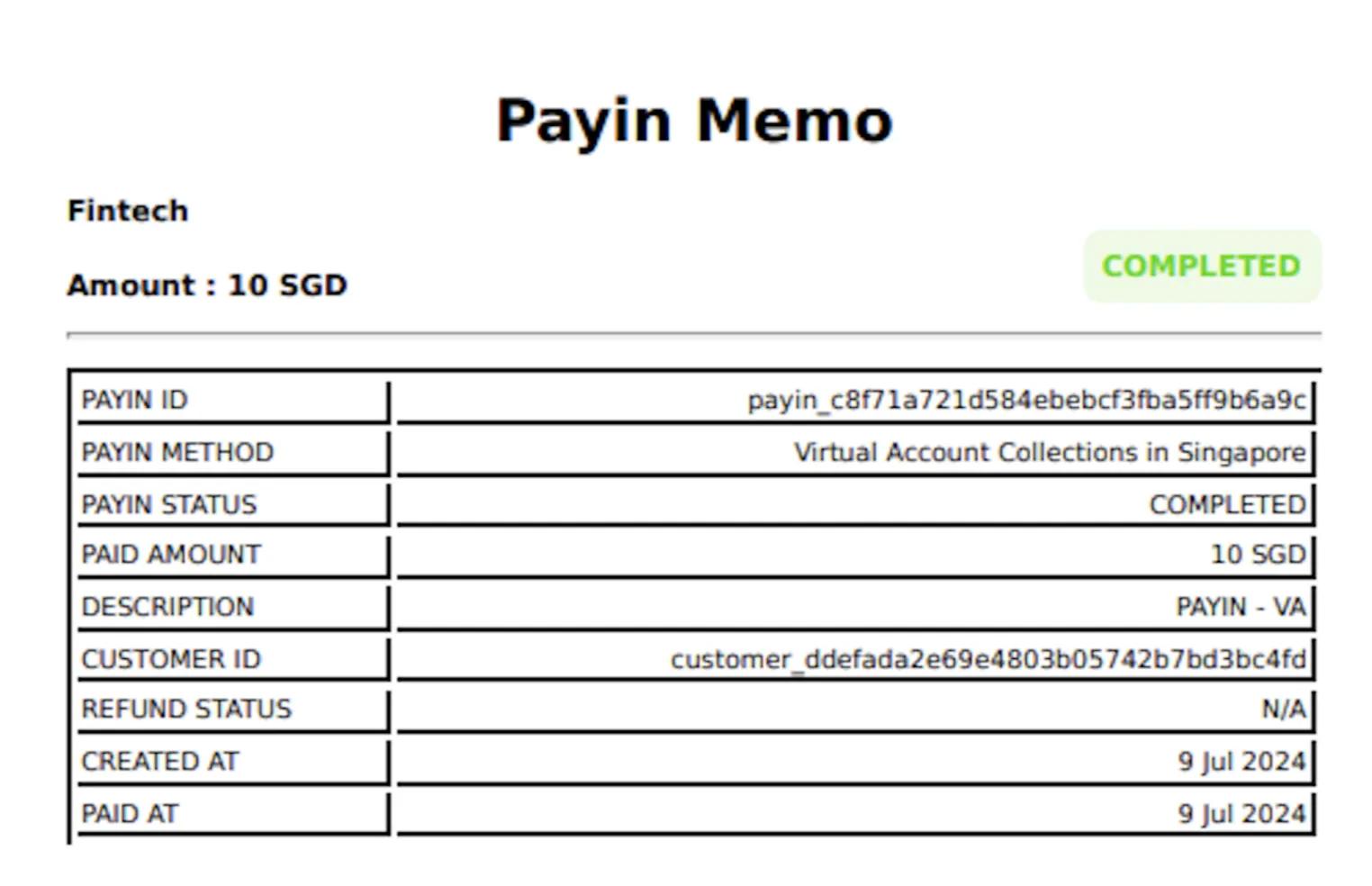
PDF reports for all completed payins/payouts are available via the dashboard and via APIs also. Go to All Payins / All Payouts and click on the transaction for which you need the transaction pdf memo & you will see a Download pdf button. Read about payin memo here and about payout memo here. A sample memo is shown below.
Transaction Disputes
We have introduced a new section called Disputed Transactions under Payins, which will show transactions (if any) that are or were under dispute from our banking partners. All disputes transactions will be held/reserved and will not be available for withdrawal until the dispute is resolved. For more information on the transaction dispute process, please reach out to your Sales or Customer Success Manager.
More info here
Account Confirmation Letter
You can now view and download an Account confirmation letter in PDF format under Virtual Accounts, which will show the full details of the account that you can share with your vendors / partners. For the master payin/payout confirmation letter, read about it here. For the Global Currency Account confirmation letter, read about it here.
Enhanced 2FA via authenticator apps
We have introduced 2FA via authenticator apps which can work as a replacement for OTPs via email / SMS during login. This will help in cases where there are challenges to receive OTPs via email or SMS. More info here.
Please do reach out to your respective account manager or support@finmo.net if you have further questions.
Try Finmo’s treasury dashboard today
Sign up to explore our dashboard for yourself. Or book a demo to talk things through with our team.